


Oct . 09, 2025 11:55 Back to list
0.3 MP Camera Compatible With Multiple Systems
At Shenzhen Minyou Digital Technology Co.,Ltd, we believe reliable imaging solutions should be accessible to all—whether for basic video calls, simple monitoring, or entry-level content creation. This is why we’ve developed our 0.3 mp camera: a compact, cost-effective option that doesn’t compromise on core functionality, especially when it comes to system compatibility. We understand that users work across diverse devices and operating systems, so our camera is built to seamless ly connect with nearly every common system. Our focus isn’t just on making a camera—it’s on making a tool that fits effortlessly into any user’s workflow, no matter their setup.
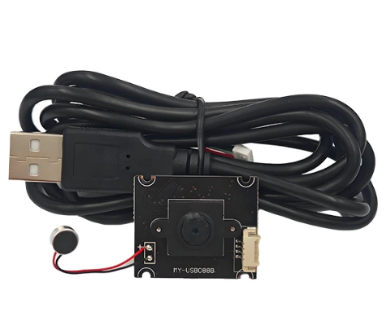
0.3 MP Camera Works Across Windows, macOS, and Linux
- Our 3 mp camera is engineered for universal compatibility, supporting all major operating systems to eliminate the frustration of “system mismatch.” At Shenzhen Minyou Digital Technology Co.,Ltd, we’ve optimized the camera to adhere to standard UVC (USB Video Class) protocols, which are pre-installed on Windows (all recent versions), macOS, and Linux.
- This means whether a user is on a Windows desktop for work, a MacBook for school, or a Linux-based embedded system for basic monitoring, the 3 mp camera plugs in and works instantly—no downloading specialized drivers or troubleshooting compatibility errors.
- The camera’s simple, intuitive design ensures it’s recognized by default by most video apps, making it ideal for users who want a “set-it-and-forget-it” solution. For anyone tired of cameras that only work with one system, our 3 mp camera delivers the flexibility to switch devices without switching tools.
Computer Camera With Mic Integrates Basic Audio for All-System Convenience
- Our computer camera with mic takes the versatility of our 3 mp camera a step further, adding a built-in microphone that works across the same wide range of systems. At Shenzhen Minyou Digital Technology Co.,Ltd, we designed this combo to meet the needs of users who want basic audio-visual functionality without the hassle of separate devices.
- The microphone uses standard UAC (USB Audio Class) protocols, so it’s recognized automatically by Windows, macOS, and Linux—just like the camera. It delivers clear, basic audio for video calls or simple recordings, with enough quality to ensure voices are intelligible (perfect for casual meetings, online classes, or quick voice notes).
- The computer camera with mic shares a single USB port for power and data, reducing cable clutter on desks and simplifying setup. For users who prioritize convenience over professional-grade audio (like students or home office workers), this all-in-one solution works seamlessly across their devices, no extra steps required.
0.3 MP Camera Balances Quality and Affordability for Multi-System Use
- Our 3 mp camera proves that compatibility and affordability don’t have to mean sacrificing usable quality. At Shenzhen Minyou Digital Technology Co.,Ltd, we’ve calibrated the camera’s 0.3 MP sensor to deliver clear, consistent visuals for its intended use cases—basic video calls, simple surveillance, or entry-level content where ultra-high resolution isn’t necessary.
- The camera handles low-light conditions reasonably well (adjusting exposure to keep subjects visible in dim rooms) and avoids excessive grain, ensuring users look presentable in calls. What makes this even more valuable is its multi-system compatibility: users don’t have to buy separate cameras for different devices (e.g., a Windows laptop and a Linux mini PC)—one 3 mp camera works for all.
- This reduces costs while maintaining functionality, making it a popular choice for budget-conscious users, small businesses, or educational institutions that need to equip multiple devices. For anyone needing reliable basic imaging across systems, our 3 mp camera offers unbeatable value.
0.3 MP Camera FAQS
Is the 0.3 mp camera compatible with older versions of Windows?
Yes, our 0.3 mp camera is compatible with older Windows versions like Windows 7. While newer Windows versions have UVC drivers pre-installed, Windows 7 also supports UVC—you may just need to enable automatic driver installation (via Windows Update) the first time you plug it in. Once installed, the camera works seamlessly with video apps on older Windows PCs.
Can the computer camera with mic be used with video conferencing apps across all systems?
Absolutely, our computer camera with mic works with Zoom and most other video conferencing apps on Windows, macOS, and Linux. The apps automatically detect the camera and mic as default devices (or let you select them in settings), so you can join calls without extra setup—whether you’re on a Mac laptop or a Windows desktop.
Does the 0.3 mp camera require a high-speed USB port, or will it work with older USB 2.0 ports?
Our 0.3 mp camera works with both older USB 2.0 ports and newer USB 3.0/3.1 ports. Since 0.3 MP video doesn’t require high data transfer speeds, USB 2.0’s bandwidth is more than sufficient. This means it’s compatible with older computers that only have USB 2.0 ports, no upgrades needed.
How does the pc camera with mic perform in noisy environments?
Our pc camera with mic is designed for basic noise reduction—while it won’t eliminate loud background noise (like a crying baby), it filters out subtle distractions (like keyboard clicks or distant TV sounds). It focuses on capturing the user’s voice (since the mic is near the camera, close to the user’s face), making it suitable for most home or small office environments.
Can the 0.3 mp camera be used with a tablet that has a USB port?
Yes, our 0.3 mp camera can be used with Android tablets that have a USB port (or support USB-C with an adapter). Most modern Android tablets support UVC cameras, so the 0.3 mp camera will be recognized by video apps once connected. This extends its compatibility beyond computers to portable devices.
-
Guide to Raspberry Pi Camera Module v3 with Powered Autofocus
NewsApr.16,2026
-
Guide to Using the raspberry pi camera module v1 3 for IoT Projects
NewsApr.09,2026
-
Exploring the Capabilities of the Raspberry Pi Camera Module 3 Noir for Diverse Applications
NewsApr.07,2026
-
Unlocking Visual Potential with the Raspberry Pi Camera Module 3 for Advanced Projects
NewsApr.04,2026
-
Raspberry Pi Noir Camera Module V2 8MP 1080p30 A Comprehensive Guide for Projects
NewsMar.31,2026
-
Comprehensive Guide to the Raspberry Pi 3 B+ Camera Module and Its Applications
NewsMar.28,2026
-

MY-USB1M818A Global Exposure Usb Camera Module With 1mp Hd Video
-

-

-

MY-DC52M-A1 Dual Lens Wide Dynamic Range Usb2.0 Camera Module With HD Video 5mp+2mp
-

MY-WHC700 Windows Hello Face Recognition Binocular USB Camera
-

MY-DC-260-A1 Dual Lens Usb2.0 Web Camera With High-definition Video 2mp+2mp
-

MY-1001-A2 AI Tracking, Gesture Recognition, Sitting Posture Detection Smart Camera Module
-

MY-USB8M158A 4K Resolution HD Video Driver-Free USB Camera Module With Microphone
