


Oct . 09, 2025 11:54 Back to list
2K HD Camera With 85° Distortion-Free Lens
At Shenzhen Minyou Digital Technology Co.,Ltd, we recognize that laptop users—from remote workers and students to content creators—need more than just a basic webcam. They need a tool that captures clear, true-to-life visuals without the fish-eye distortion or grainy quality of standard cameras, paired with audio that keeps them connected. This is why we’ve developed our 2k hd camera with an 85° distortion-free lens: a solution that balances wide coverage with sharp detail, and integrates seamlessly with laptop setups. Our focus on user-centric design shapes every camera with mic for laptop we create, ensuring convenience, quality, and reliability for every use case.
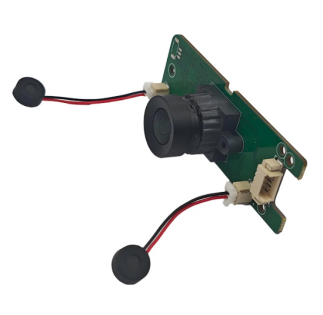
2K HD Camera Delivers Sharp Detail with 85° Distortion-Free View
- Our 2k hd camera stands out for its 85° distortion-free lens, a feature that redefines how laptop users capture and share visuals. At Shenzhen Minyou Digital Technology Co.,Ltd, we engineered the lens to avoid the “fish-eye” effect common in wide-angle cameras—so edges of the frame (like room corners or group members in a video call) stay straight and true, no stretching or warping.
- The 2K resolution complements this by capturing fine details: text on documents held up to the camera, subtle facial expressions in video meetings, or small product features for content creation—all with crisp clarity.
- The 85° angle strikes the perfect balance, too: wide enough to fit a small group (for team calls) or a full desk setup (for tutorials), but not so wide that it captures unnecessary background clutter.
- Whether used for remote work, online learning, or streaming, our 2k hd camera ensures every visual is sharp, natural, and professional.
Camera With Mic for Laptop Integrates Clear Audio with 2K Visuals
- Our camera with mic for laptop combines our 2K HD distortion-free camera with a high-quality built-in microphone, creating an all-in-one solution for laptop users. At Shenzhen Minyou Digital Technology Co.,Ltd, we designed the microphone to match the camera’s quality: it uses noise-canceling technology to filter out background distractions, focusing on the user’s voice.
- This ensures audio is clear and intelligible in video calls, voice recordings, or live streams—no more asking colleagues to repeat themselves or viewers complaining about static. The mic is positioned close to the camera (and thus the laptop user’s face) for optimal sound capture, and it syncs perfectly with the 2K video to avoid lip-sync delays.
- Installation is simple: just plug the device into the laptop’s USB port, and it’s ready to use—no extra cables or software needed. For laptop users who want to avoid the hassle of separate cameras and mics, our camera with mic for laptop is a streamlined, high-performance choice.
Webcam and Mic for Laptop Offers Driver-Free Convenience
- Our webcam and mic for laptop is built for hassle-free use, with driver-free functionality that lets laptop users start creating or connecting in seconds. At Shenzhen Minyou Digital Technology Co.,Ltd, we understand that not everyone has technical expertise—and that waiting for drivers to download or troubleshoot compatibility issues is frustrating.
- That’s why our webcam and mic for laptop uses standard UVC (USB Video Class) and UAC (USB Audio Class) protocols, which are pre-installed on most operating systems (Windows, macOS, Linux). This means you can plug it into your laptop’s USB port, open your favorite video app, and start using it immediately—no extra steps.
- The driver-free design also ensures stability: the webcam and mic work consistently across updates and different laptop models, so you never have to worry about sudden glitches during an important meeting or stream. For users who prioritize convenience without sacrificing quality, this plug-and-play solution is a game-changer.
2K HD Camera FAQS
Is the 2k hd camera compatible with both Windows and macOS laptops?
Yes, our 2k hd camera is fully compatible with both Windows and macOS laptops. It uses standard driver-free protocols (UVC) that work seamlessly with all recent versions of these operating systems—no need to download extra software. Whether you’re using a Windows laptop for work or a MacBook for content creation, the camera will connect and perform consistently.
Can the camera with mic for laptop reduce background noise in busy environments?
Absolutely, our camera with mic for laptop is designed to reduce background noise in busy environments. Its noise-canceling technology filters out sounds like kids playing, pet barks, or kitchen activity, focusing on your voice. This ensures your audio stays clear in video calls or recordings, even when you can’t control your surroundings.
Does the webcam and mic for laptop have adjustable brightness or contrast settings for low-light rooms?
Yes, our webcam and mic for laptop has adjustable brightness and contrast settings. You can tweak these via your video app’s settings (like Zoom’s “Video Settings” or Teams’ “Device Settings”) to brighten your face in low-light rooms, ensuring you’re visible and clear during calls—no more appearing as a dark silhouette.
How does the 85° distortion-free lens of the 2k hd camera compare to wider lenses for laptop use?
Our 2k hd camera’s 85° lens avoids the distortion of wider 100° lenses, which often stretch edges of the frame. The 85° angle is wide enough to fit small groups or a full desk, but not so wide that it captures unnecessary clutter (like a messy background). This balance makes it more natural for laptop use, whether for calls or content.
Can the webcam and mic for laptop be used with external monitors connected to a laptop?
Yes, our webcam and mic for laptop works perfectly with external monitors. You can place the webcam on top of the external monitor (it has a clip-on design for easy mounting) and still use it with your laptop—since it connects via USB, the laptop processes the video and audio, even if you’re using an external screen. This setup is ideal for remote workstations.
-
Guide to Raspberry Pi Camera Module v3 with Powered Autofocus
NewsApr.16,2026
-
Guide to Using the raspberry pi camera module v1 3 for IoT Projects
NewsApr.09,2026
-
Exploring the Capabilities of the Raspberry Pi Camera Module 3 Noir for Diverse Applications
NewsApr.07,2026
-
Unlocking Visual Potential with the Raspberry Pi Camera Module 3 for Advanced Projects
NewsApr.04,2026
-
Raspberry Pi Noir Camera Module V2 8MP 1080p30 A Comprehensive Guide for Projects
NewsMar.31,2026
-
Comprehensive Guide to the Raspberry Pi 3 B+ Camera Module and Its Applications
NewsMar.28,2026
-

MY-USB1M818A Global Exposure Usb Camera Module With 1mp Hd Video
-

-

-

MY-DC52M-A1 Dual Lens Wide Dynamic Range Usb2.0 Camera Module With HD Video 5mp+2mp
-

MY-WHC700 Windows Hello Face Recognition Binocular USB Camera
-

MY-DC-260-A1 Dual Lens Usb2.0 Web Camera With High-definition Video 2mp+2mp
-

MY-1001-A2 AI Tracking, Gesture Recognition, Sitting Posture Detection Smart Camera Module
-

MY-USB8M158A 4K Resolution HD Video Driver-Free USB Camera Module With Microphone
