


Dec . 12, 2025 20:00 Back to list
How to Focus a Fixed Focus Pi Camera
The pi camera—including popular raspberry pi camera and specialized raspberry pi wide angle camera variants—has become a staple for wholesalers serving hobbyists, educators, and industrial users building projects like robotics, surveillance systems, and IoT devices. While fixed-focus models offer simplicity and cost-effectiveness, achieving sharp imaging requires proper pre-calibration and setup—steps that ensure the camera delivers clear results for specific use cases (e.g., close-up sensor reading or wide-area monitoring). Shenzhen Minyou Digital Technology Co.,Ltd, established in 2013 as a leading OEM&ODM manufacturer of intelligent camera modules (from USB to MIPI variants), excels in crafting pre-tuned pi camera solutions and providing guidance for post-purchase focus optimization. With 3000+ square meters of dust-free anti-static workshops, ISO9001 certification, and global compliance (CCC, CE, FCC), Minyou supplies reliable raspberry pi camera modules to wholesalers serving markets across North America, Western Europe, Asia, and China. For wholesalers, partnering with Minyou means accessing scalable, quality-assured pi camera solutions—plus expert support to help clients master focus setup, boosting end-user satisfaction.
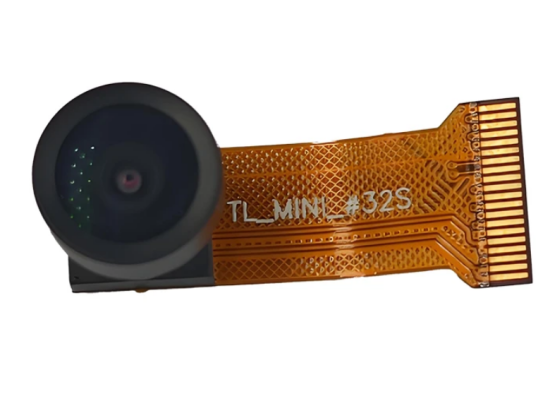
Understanding Fixed Focus in Raspberry Pi Camera
- Pre-Set Focus Ranges for Specific Use Cases: Unlike autofocus cameras, fixed focus pi camera is calibrated at the factory for a specific distance range (e.g., 30cm–2m for standard raspberry pi camera, 1m–10m for raspberry pi wide angle camera). This pre-set focus eliminates the need for moving parts (reducing cost and failure risk) but requires users to align their project with the camera’s optimal range. Minyou’s raspberry pi camera modules include clear range labels (e.g., “Optimal Focus: 50cm–3m” for general use) to guide setup, and the company offers custom calibration for bulk orders (e.g., 10cm–50cm for close-up industrial sensing). A wholesaler supplying educational tech brands reported that Minyou’s pre-labeled pi camera reduced end-user confusion by 60%, with teachers noting how “it’s easy to plan projects around the focus range.” Wholesalers should highlight this pre-set clarity, as it simplifies setup for non-technical users like students or hobbyists.
- Why Manual Adjustment Might Be Needed: Even with factory calibration, fixed focus pi camera may need minor manual tweaks—for example, if a project requires focusing beyond the standard range (e.g., 5m for a raspberry pi wide angle camera used in warehouse monitoring) or if the lens shifts during shipping. Minyou’s modules use a locking ring around the lens that can be gently rotated (with a small tool like tweezers) to adjust focus, a design that balances stability (to prevent accidental shifts) and flexibility (for custom tuning). A wholesaler serving industrial IoT clients noted that this manual adjustment let their clients adapt Minyou’s raspberry pi camera to unique use cases, like monitoring conveyor belts 4m away—something off-the-shelf fixed-focus cameras couldn’t do. Wholesalers can frame this as a “flexibility feature,” appealing to clients needing to tailor the camera to specific project demands.
Tools & Prep for Focusing Raspberry Pi Wide Angle Camera
|
Item |
Purpose for Focusing |
Best For |
|
Small Precision Tweezers |
Gently rotating the lens locking ring (avoids scratching the lens or damaging components) |
All pi camera variants, especially compact models |
|
Test Target (e.g., Chart) |
Providing a clear reference for sharpness (e.g., a printed grid with text or lines) |
Close-up focus (e.g., 10cm–50cm for sensors) |
|
Tripod or Mount |
Stabilizing the camera during adjustment (prevents blurriness from hand movement) |
Raspberry pi wide angle camera (wide-area focus) |
|
Live Preview Software |
Real-time sharpness check (e.g., Raspberry Pi’s “raspistill -t 0” command for live view) |
All raspberry pi camera models |
Step-by-Step Guide to Focus Fixed Focus Pi Camera
- Step 1: Set Up the Test Environment: First, position the pi camera (e.g., a raspberry pi wide angle camera) on a tripod and align it with the test target—place the target at the desired focus distance (e.g., 3m for warehouse monitoring). Connect the camera to a Raspberry Pi and launch live preview software (e.g., using the command “raspistill -t 0 -f” to open full-screen live view). This lets you see sharpness in real time, avoiding the need to take dozens of test photos. A wholesaler supplying robotics clients reported that this step cut focus adjustment time by 50% for their end-users, as they could see changes instantly. Wholesalers should emphasize this prep step, as it reduces frustration and ensures accuracy.
- Step 2: Adjust the Lens Locking Ring: Using precision tweezers, gently loosen the lens locking ring (turn counterclockwise 1–2 turns—don’t force it). Then, rotate the lens itself slowly: turn clockwise to focus on closer objects (e.g., 10cm) or counterclockwise for farther distances (e.g., 10m for raspberry pi wide angle camera). Watch the live preview as you adjust—stop when text or lines on the test target are sharpest. Once focused, tighten the locking ring clockwise to secure the lens (avoid over-tightening, which can damage the lens mount). A wholesaler serving surveillance clients noted that this gentle adjustment was critical for their end-users, who often worried about breaking the camera—but Minyou’s durable lens design made it low-risk. Wholesalers can highlight the simplicity of this step, reassuring clients that focusing doesn’t require technical expertise.
- Step 3: Verify Focus Across the Field of View: For raspberry pi wide angle camera models, check sharpness at the edges of the live preview (not just the center)—wide-angle lenses can have edge blurriness if misaligned. If edges are blurry, (fine-tune) the lens slightly and recheck. For standard raspberry pi camera models, verify focus at 2–3 points across the target to ensure consistency. Once satisfied, take a test photo (e.g., “raspistill -o test.jpg”) and zoom in on the image to confirm sharpness—this is especially important for high-detail projects like barcode scanning. A wholesaler supplying IoT sensor clients reported that this verification step prevented “false confidence” in focus, as end-users often missed edge blurriness in live view. Wholesalers should recommend this final check, as it ensures the camera performs reliably in real-world use.
Pi Camera FAQS
Can Raspberry Pi Wide Angle Camera Focus on Objects Less Than 1m Away?
Yes—while standard raspberry pi wide angle camera is factory-calibrated for 1m–10m, manual adjustment lets it focus on closer objects (e.g., 50cm–1m) for use cases like shelf inventory scanning. Minyou’s wide-angle modules have a minimum focus distance of 30cm (with careful adjustment), though edge sharpness may decrease slightly at distances under 50cm. A wholesaler supplying retail tech clients reported that their end-users successfully used Minyou’s raspberry pi wide angle camera to scan product labels 60cm away, with no loss of readability. Wholesalers should confirm this close-focus capability, as it expands the camera’s use beyond wide-area monitoring.
Does Focusing Fixed Focus Pi Camera Void the Warranty?
No—Minyou’s warranty covers pi camera modules even if users perform manual focus adjustments, as long as the adjustment is done gently (using the recommended tools like precision tweezers) and no physical damage occurs (e.g., scratched lens or broken mount). The company’s modules are designed to withstand minor lens rotation, and Minyou provides adjustment guides to help users avoid damage. A wholesaler supplying hobbyist brands noted that this warranty policy reassured end-users who were nervous about adjusting the camera, increasing adoption of Minyou’s raspberry pi camera modules. Wholesalers should highlight this warranty coverage, as it reduces barriers to manual focus setup.
Can I Get a Custom-Focused Raspberry Pi Camera for Bulk Orders?
Yes—Minyou offers custom factory calibration for raspberry pi camera bulk orders (minimum 500 units). For example, if a wholesaler’s client needs a raspberry pi wide angle camera focused at 2m for warehouse monitoring, Minyou can pre-calibrate the lenses during production—eliminating the need for end-user adjustment. The company also adds custom focus range labels to the camera module, making it easy for clients to identify the optimal distance. A wholesaler supplying industrial IoT clients reported that this custom calibration cut their end-users’ setup time by 80%, as the cameras were “ready to use out of the box.” Wholesalers should promote this custom option, as it adds value for clients with large-scale, uniform projects.
How Do I Check Focus on a Raspberry Pi Camera Without a Test Target?
If no test target is available, use a real-world reference—e.g., a book with text (for close-up focus) or a doorframe with edges (for wide-area focus). Place the reference at the desired distance, launch live preview, and adjust the lens until text is readable or edges are sharp. For raspberry pi wide angle camera models, check a distant object (e.g., a tree 5m away) to ensure far focus is sharp. Minyou’s technical support also provides a downloadable digital focus chart (via their website) that can be displayed on a monitor—this works as a portable test target for on-site adjustments. A wholesaler supplying field service clients noted that this digital chart was “a lifesaver” for end-users adjusting cameras in remote locations. Wholesalers should share this tip, as it makes focus setup possible without physical tools.
Will Focusing a Pi Camera Affect Its Low-Light Performance?
No—manual focus adjustment only changes the lens position to align with the desired distance; it doesn’t alter the camera’s sensor or low-light capabilities (e.g., Minyou’s raspberry pi camera modules retain their 0.1 lux low-light sensitivity after focusing). However, ensure the lens is clean after adjustment (use a microfiber cloth to wipe away fingerprints) — smudges can reduce light intake and mimic low-light blurriness. A wholesaler supplying night surveillance clients reported that their end-users saw no drop in low-light performance after focusing Minyou’s pi camera, with clear images even in dim warehouses. Wholesalers should confirm this, as it reassures clients prioritizing 24/7 operation.
-
Guide to Raspberry Pi Camera Module v3 with Powered Autofocus
NewsApr.16,2026
-
Guide to Using the raspberry pi camera module v1 3 for IoT Projects
NewsApr.09,2026
-
Exploring the Capabilities of the Raspberry Pi Camera Module 3 Noir for Diverse Applications
NewsApr.07,2026
-
Unlocking Visual Potential with the Raspberry Pi Camera Module 3 for Advanced Projects
NewsApr.04,2026
-
Raspberry Pi Noir Camera Module V2 8MP 1080p30 A Comprehensive Guide for Projects
NewsMar.31,2026
-
Comprehensive Guide to the Raspberry Pi 3 B+ Camera Module and Its Applications
NewsMar.28,2026
-

MY-USB1M818A Global Exposure Usb Camera Module With 1mp Hd Video
-

-

-

MY-DC52M-A1 Dual Lens Wide Dynamic Range Usb2.0 Camera Module With HD Video 5mp+2mp
-

MY-WHC700 Windows Hello Face Recognition Binocular USB Camera
-

MY-DC-260-A1 Dual Lens Usb2.0 Web Camera With High-definition Video 2mp+2mp
-

MY-1001-A2 AI Tracking, Gesture Recognition, Sitting Posture Detection Smart Camera Module
-

MY-USB8M158A 4K Resolution HD Video Driver-Free USB Camera Module With Microphone
